Skip to content
cursist login,logging in to Cursist,login does not work,course platform login
  • How it works
    • How does it work?
    • Find a pottery supply store
    • Find a ceramic kiln
    • Ceramics calendar
    • Glossary
    • FAQ – Frequently Asked Questions
  • Courses
    • Unique throwing techniques for complex shapes
    • Production throwing
    • Throwing on the potter’s wheel
  • Products
    • NEW E-book: Small kilns, big results
    • E-book: Making ceramic lamps
    • E-book: Your own pottery studio
  • Blog
  • About us
  • How it works
    • How does it work?
    • Find a pottery supply store
    • Find a ceramic kiln
    • Ceramics calendar
    • Glossary
    • FAQ – Frequently Asked Questions
  • Courses
    • Unique throwing techniques for complex shapes
    • Production throwing
    • Throwing on the potter’s wheel
  • Products
    • NEW E-book: Small kilns, big results
    • E-book: Making ceramic lamps
    • E-book: Your own pottery studio
  • Blog
  • About us
Login
  • EN
    • NL

Signing in on our course platform

In this article, we’d like to share some more information about how to sign in to our website, how to sign in to our course platform and what to do if you can’t sign in.
  • 5 September, 2022
  • 06:58

Once you have purchased a course through our website, an account is automatically created for you on our course platform through Teachable ( https://decursist.teachable.com)). Here you’ll find the course(s) you have signed up for. Add this link to your bookmarks!

You can also go there by clicking the “login” button at the top of this website.

  • Your username/email is the email address you used to purchase the course on our website.
  • The password is this one: Cursist (unless you have already changed it yourself) And this is where you log in if you want to view the course.
  • You can change your password in the course platform through Teachable, if you want.

What can you see with your account on the course platform?

When you are signed in to the course platform, you can do several things:

  • First you will see an overview of the course(s) you signed up for.
    If you click on a course here, you can view that course.

  • In the top right corner, you can go to Account Information by clicking on the icon.
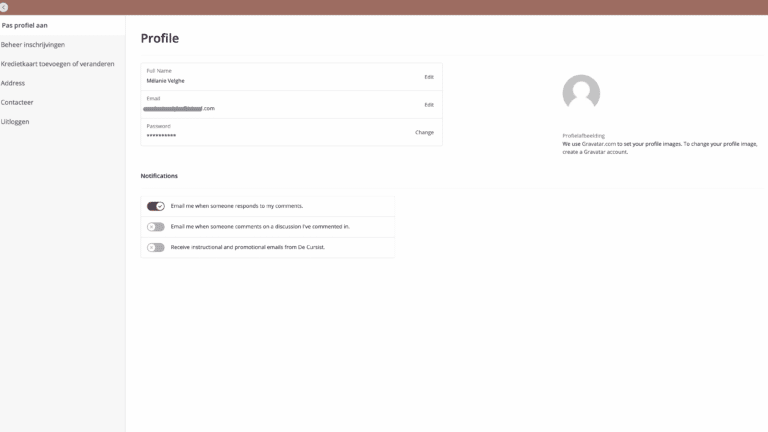
    Under ‘Customise your profile’ you can make changes and set your own unique password.
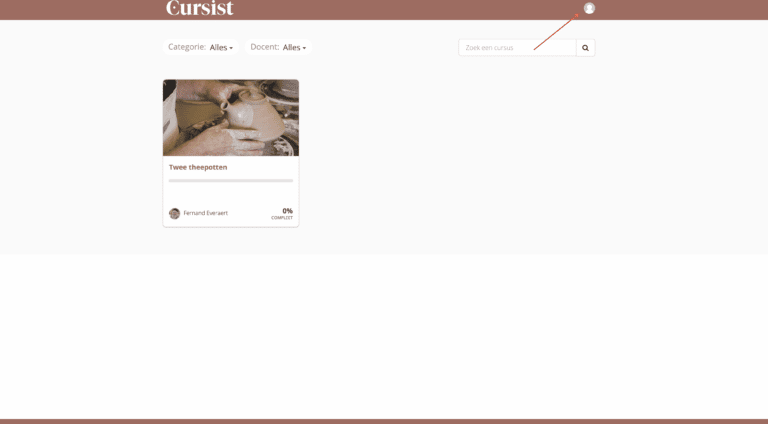
Cursist inloggen screenshot zoekfunctie
Cursist inloggen screenshot profiel pagina

What should you do if you can't sign in?

Did you forget the password for our course platform?

  • Try “cursist” first because that’s the default password.
    If you have never changed it, this will still be the password.
  • Did you change your own password and you don’t remember what it was?
    Then click ‘forgot password’. Then enter your email address and you will receive an email allowing you to reset your password and choose a new one. After that, you should be able to sign in again.
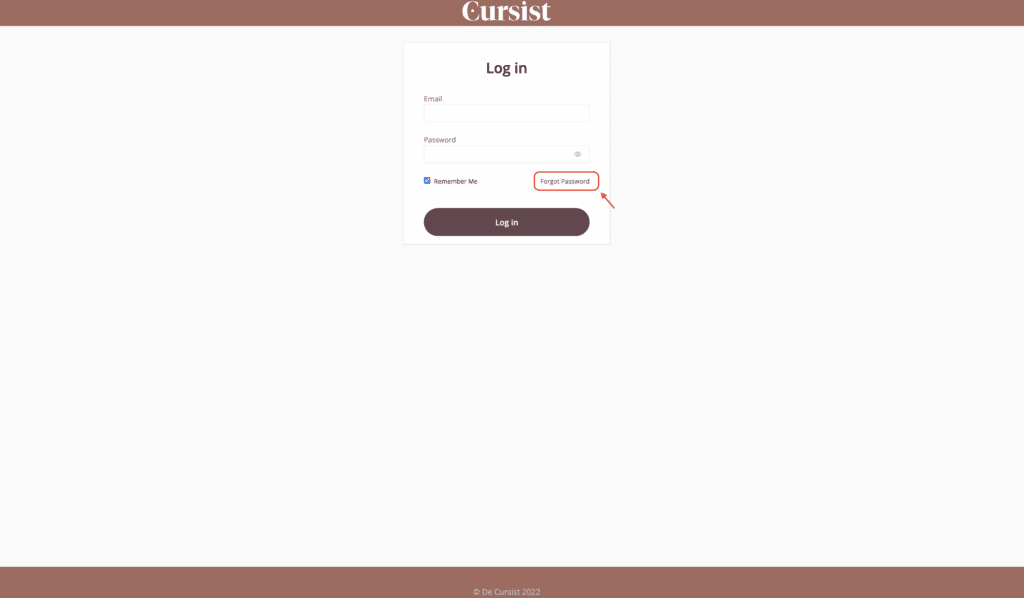
Cursist inloggen screenshot log in pagina

There you go! Hopefully this has cleared up any issues you might have. You can read more about how to change your password or your email address in this article.

If you still run into trouble, please do not hesitate to send us a message.

Check out all of the online courses we offer and dive into the world of clay!

Discover all courses

Discover more blog posts here

Pieces of wood and wood ash for ash glaze
Techniques
Nele

Ash glaze

Ash glaze is one of the oldest types of glaze, and it was first used in East Asia.

Grijze ruwe tafellamp
Shapes
Nele

The table lamp

Here’s a fun little project to make out of clay: a table lamp.

A yellow and blue ceramic test plate held in the hands
Articles
Nele

Making test tiles

Testing, testing, testing! It’s unavoidable. For every type of clay that you use, you’ll need to make a test tile. This will help you to chart the shrinkage and colour

cursist login,logging in to Cursist,login does not work,course platform login
Instagram Facebook Youtube Pinterest
  • EN
    • NL

About us
About Cursist
Contact

Our teachers
José Mariscal
Inge Burgerhoudt
Katrin Dekoninck
Sofie De Cleene
Rudie Delanghe
Louise Daneels
Kathleen Bessemans
Sofie Goethals
Caroline Kesteleyn
Aster Caemaert
Anima Roos
Fernand Everaert
Veerle Van Overloop

Courses
Unique throwing techniques
Pottery throwing
Advanced throwing
Throwing tall in sections
Production throwing

Practical
How it works
Ceramic kiln search
Pottery store search
Glossary
Frequently Asked Questions

Downloads
Beginner’s guide
Shrinkage ruler
Clay stages

Terms and conditions | Return policy | Privacy policy | Cookies

Manage consent

To provide the best experience, we use technologies such as cookies to store and/or access information about your device. By consenting to these technologies, we may process data such as browsing behaviour or unique IDs on this site. If you do not consent or withdraw your consent, certain features and functions may be adversely affected.

Functional Always active
The technical storage or access is strictly necessary for the legitimate purpose of enabling the use of a specific service expressly requested by the subscriber or user, or for the sole purpose of carrying out the transmission of a communication over an electronic communications network.
Preferences
De technische opslag of toegang is noodzakelijk voor het legitieme doel voorkeuren op te slaan die niet door de abonnee of gebruiker zijn aangevraagd.
Statistics
Technical storage or access used exclusively for statistical purposes. De technische opslag of toegang die uitsluitend wordt gebruikt voor anonieme statistische doeleinden. Zonder dagvaarding, vrijwillige naleving door uw Internet Service Provider, of aanvullende gegevens van een derde partij, kan informatie die alleen voor dit doel wordt opgeslagen of opgehaald gewoonlijk niet worden gebruikt om je te identificeren.
Marketing
The technical storage or access is necessary to create user profiles for sending advertising, or to track the user on a website or across different websites for similar marketing purposes.
  • Manage options
  • Manage services
  • Manage {vendor_count} vendors
  • Read more about these purposes
View preferences
  • {title}
  • {title}
  • {title}